Troubleshooting
If your AI assistant is having trouble connecting to the MCP server, ensure the following:
- The Docker app is already running before starting your AI assistant. Docker must be running for the MCP server to start and during the whole time you wish to use the Capsule MCP server
- Your Capsule API token is valid
- Your config file is formatted correctly - see example config file
If you’re still having issues, please let us know with the following information:
- Your Operating System & what AI assistant you are using
- Screenshots / the exact error message you are seeing
- If some questions about your Capsule account succeed and others do not - i.e. your AI assistant is connecting to the MCP server, but you’re having an issue with a specific question/prompt
- Locate and send us the logs for the MCP server:
- Claude Desktop
- In
Settings→Developer→Local MCP Servers, you should seecapsule-mcp - Select
View Logsto view the file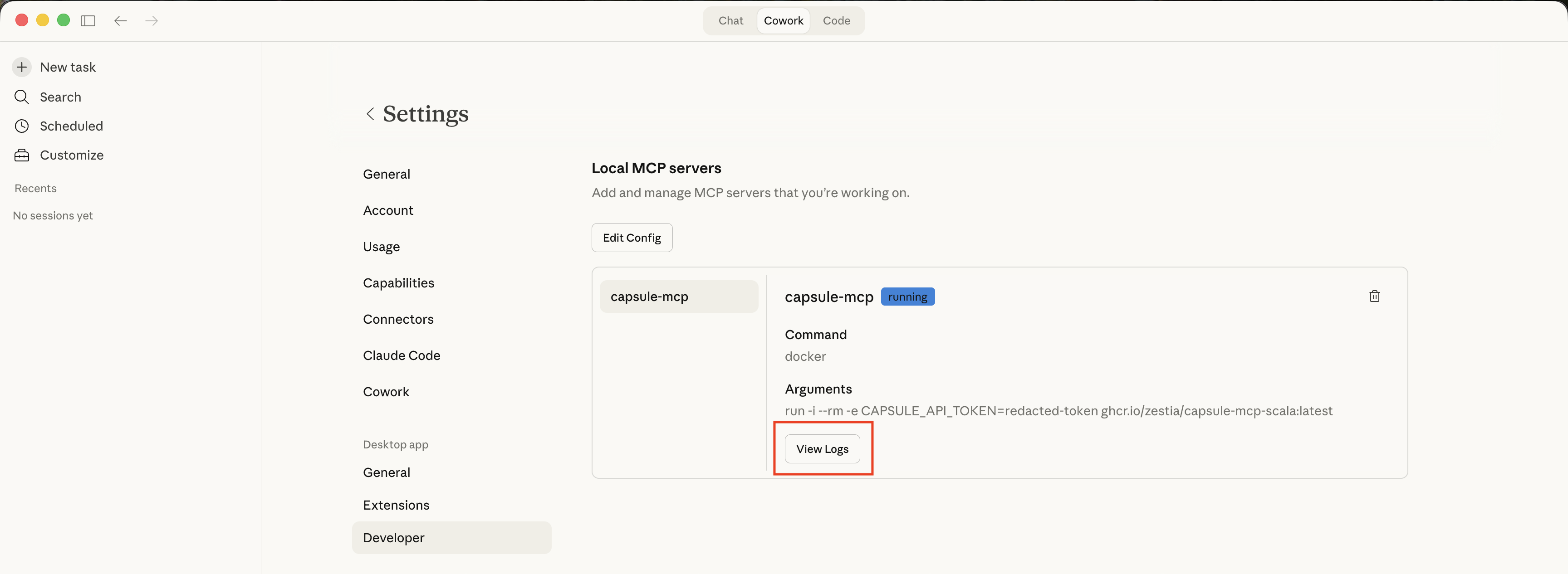
- In
- Cursor
- In
Settings→Cursor Settings→Tools & MCP, underInstalled MCP Serversfindcapsule-mcp - Select
Show output
- In
- Claude Desktop
- Anything else you think might be helpful
The source code for this page can be found here.